Table of contents:
Is Node.js single-threaded?
Yes and no. Your JavaScript code runs on a single thread, the main thread, which runs the event loop. But Node.js itself is not single-threaded:
- libuv thread pool: a pool of 4 threads by default (configurable with the
UV_THREADPOOL_SIZEenvironment variable) that handles operations the operating system can't do asynchronously, such as file system (fs),dns.lookup, somecryptofunctions (pbkdf2,scrypt,randomBytes) andzlibcompression. - Operating system: network I/O (HTTP, TCP, database connections) doesn't use the thread pool. libuv delegates it to
the OS asynchronous APIs (
epollon Linux,kqueueon macOS,IOCPon Windows). - V8: uses background threads for garbage collection and compilation.
So, Node.js can handle thousands of concurrent I/O operations with a single JavaScript thread, because the main thread
only runs the callbacks when the work is done. When you need to run JavaScript in parallel, you can use
worker_threads, child_process, cluster, or run multiple instances of your application.
CPU-bound vs. I/O-bound tasks
Node.js executes your code in the call stack of the main thread. When a CPU-bound task is executed, it blocks the main thread: no other request, timer or callback runs until it finishes. So, a single heavy CPU-bound task can impact the performance of the whole application.
Examples of CPU operations:
- Mathematical computation
- Image, video and audio processing
- Compiling or parsing code (including
JSON.parse/JSON.stringifyof huge payloads) - Artificial Intelligence (e.g. running models locally)
- Regular expressions (especially vulnerable ones, see ReDoS)
- Cryptographic operations (e.g. hashing passwords)
When the task is I/O-bound, Node.js handles it asynchronously, without blocking the main thread: the work happens in the OS or in the libuv thread pool, and the callback runs when the result is ready.
Examples of I/O operations:
- Network operations (
fetch, HTTP, WebSockets) - Database operations
- File system operations
- Stream operations
- E-mail operations
- Timers and delayed executions (although these are not strictly I/O-bound, they are non-blocking and handled asynchronously)
Be careful with the synchronous versions of the Node.js APIs (functions ending with Sync): they block the main thread
even for I/O operations.
Don't do this:
import { readFileSync }{ createServer }( ( _req,{
// blocks the main thread on every request
const file = readFileSync( "./report.json ",( file)( 8000)Do this instead:
import { readFile }promises ";{ createServer }( async ( _req,{
// the main thread keeps handling other requests while the file is read
const file = await readFile( "./report.json ",( file)( 8000)Node.js event loop
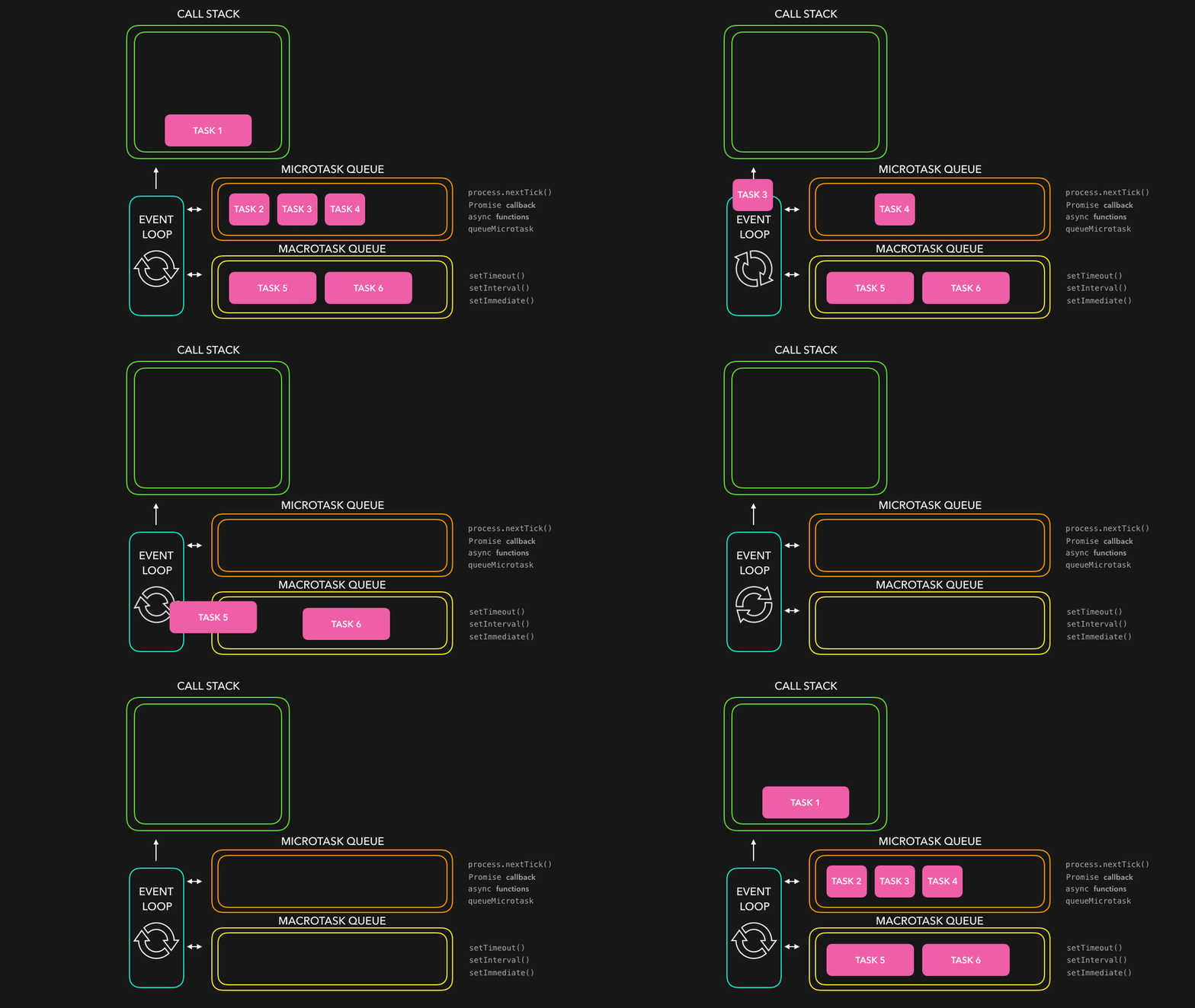
The event loop orchestrates asynchronous (non-blocking I/O) operations and manages the flow of events in the application. It enables the application to continue executing other code while I/O operations are in progress, preventing blocking and enhancing performance.
When an asynchronous operation finishes, its callback is placed in a queue. When the call stack is empty, the event loop takes the next callback and runs it.
Event loop phases
The Node.js event loop (implemented by libuv) consists of 6 phases, and each phase has its own queue of callbacks:
- Timers: executes callbacks scheduled by
setTimeoutandsetInterval - Pending callbacks: executes some system callbacks deferred to the next loop iteration (e.g. TCP errors)
- Idle & prepare: only used internally
- Poll: retrieves new I/O events and executes their callbacks (most of your code runs here)
- Check: executes callbacks scheduled by
setImmediate - Close callbacks: executes close callbacks (e.g.
socket.on("close", ...))
When there is nothing else to do (no timers, no pending I/O, no active servers), the event loop ends and the process exits.
Detailed overview about the event loop here
Microtasks: process.nextTick and Promises
Besides the phases above (also known as the macrotasks), there are two microtask queues that are not part of libuv:
- nextTick queue: callbacks scheduled with
process.nextTick - Promise queue: Promise callbacks (
.then,.catch,await) andqueueMicrotask
Microtasks have higher priority: they run as soon as the current operation finishes,
after every single callback and before the event loop moves on. That's why an infinite chain of
Promises or process.nextTick can starve the event loop as well as a heavy CPU-bound task.
Example (order.cjs):
console.( "1. sync ")( ( )( "timeout")( ( )( "immediate")( )( ( )( "promise")( ( )( "nextTick")( "2. sync ")Output:
1.( see below)In CommonJS, the nextTick queue runs before the Promise queue. However, if you run the same code as an ES module
(.mjs, .ts with import, or "type": "module"), you will see promise before nextTick,
because the ES module itself is evaluated asynchronously, inside a Promise.
For new code, prefer queueMicrotask (a web standard) over process.nextTick.
setTimeout vs. setImmediate
In the main module, the order between setTimeout(callback, 0) and setImmediate is not guaranteed:
it depends on how fast the process starts. But inside an I/O callback, setImmediate always runs first,
because the check phase comes right after the poll phase.
Example:
const { readFile }( "node:fs")( __filename,( ){
setTimeout( ( )( "timeout")( ( )( "immediate")/ always: immediate, timeout
Don't block the event loop
The golden rule of Node.js: the main thread should only orchestrate work, not do heavy work. If a single request takes 200ms of CPU, every other request waits 200ms.
Measuring the event loop delay
You can measure how much the event loop is being delayed with monitorEventLoopDelay.
Exporting this metric to your monitoring tool (e.g. OpenTelemetry, Prometheus) is a good practice.
import { monitorEventLoopDelay }( { resolution: 20 }( )( ( ){
// values are in nanoseconds
const p99 = histogram.( 99)( `Event loop delay p99: ${ p99.( 2)( )( )Splitting heavy work
If you have a long loop that can't be moved to another thread, you can split it into chunks and yield to the event loop
between them with setImmediate from node:timers/promises, so other callbacks have a chance to run.
Don't do this:
function processAll( items: Item[ ]{
// 1 million items blocks the main thread until the end
for ( const item of items){
processItem( item)Do this instead:
import { setImmediate }promises ";( items: Item[ ]{
for ( let i = 0;+ = chunkSize){
for ( const item of items.( i,+ chunkSize){
processItem( item)/ lets the event loop handle other requests before the next chunk
await setImmediate( )This doesn't make the work faster, it only keeps the application responsive. For really heavy work, use worker_threads.
Node.js worker_threads
Worker threads run JavaScript in parallel, in the same process. Each worker has its own V8 instance and its own event loop, and they communicate with messages. This is the recommended way to run CPU-bound JavaScript code without blocking the main thread.
Example:
import { Worker,/ CPU-bound task: calculating the fibonacci sequence
function fibonacci( n: number){
if ( n <= 1)( n - 1)+ fibonacci( n - 2)( n: number){
return new Promise<number>( ( resolve,{
// runs this same file in a new thread
const worker = new Worker( import.{ workerData: n }( "message",( "error",( isMainThread){
console.( "Main thread is free to handle other tasks")( 45)( `Result from worker: ${ result}{
// worker thread: has its own event loop
parentPort?( fibonacci( workerData)Creating a worker has a cost (startup time and its own memory), so don't create one per request. In real applications, use a pool of workers, such as Piscina.
Node.js child_process
You can use child_process to spawn separate processes, each one with its own memory.
Nowadays, it is mostly used to run other programs (e.g. ffmpeg, git, Python scripts),
while worker_threads is preferred for CPU-bound JavaScript.
Example:
import { execFile }{ promisify }( execFile)/ converting a video with ffmpeg without blocking the main thread
const { stdout }( "ffmpeg",[ "-i",mp4 ",webm "]Prefer execFile or spawn over exec: exec runs the command inside a shell,
so passing user input to it can lead to command injection.
You can also use fork to run another Node.js file, with a built-in message channel between the processes:
import { fork }( "./child.ts ")( "message",( result){
console.( `Result from child process: ${ result}( "start")child.ts:
function fibonacci( n: number){
if ( n <= 1)( n - 1)+ fibonacci( n - 2)( "message",( message){
if ( message === "start"){
process.( fibonacci( 45)( 0)Recent Node.js versions run .ts files natively (type stripping), so you don't need ts-node or a build step for these examples.
Node.js cluster
You can use Node.js cluster to take advantage of multi-core systems by creating multiple instances (processes)
of the same application. Unlike child_process, it is made for scaling servers: all workers share the same port,
and the primary process distributes the connections between them.
Example:
import cluster from "node:cluster";{ createServer }{ availableParallelism }( cluster.{
console.( `Primary PID ${ process./ availableParallelism is the recommended replacement for cpus().length
for ( let i = 0;( )+ + ){
cluster.( )( "exit",( worker){
console.( `Worker PID ${ worker. starting a new one `)( ){
const server = createServer( ( _req,{
res.( `Hello World from PID ${ process.( 8000,( ){
console.( `Worker PID ${ process.( "SIGTERM",( ){
console.( `Worker PID ${ process... `)/ stops accepting new connections and waits for the current ones
server.( ( )( 0)Scaling in production: PM2 and containers
PM2
If you deploy to a virtual machine, PM2 is a process manager that keeps your application
online 24/7. It provides process management, monitoring, log management and a built-in cluster mode,
so you don't need to write the cluster code yourself.
npm install pm2 -g
pm2 start app.--name app_namespecifies the application's name-i maxstarts one instance per available CPU core
Containers
If you deploy with Docker and Kubernetes (or a platform like Railway, Fly.io, AWS ECS or Cloud Run),
the common approach is one Node.js process per container: the platform restarts it when it crashes and
scales it horizontally by adding more containers (replicas), instead of using cluster or PM2 inside the container.
In both cases, always handle the SIGTERM signal to finish the current requests before shutting down (graceful shutdown).
When to use Node.js and when to avoid it
Node.js is very performant at handling I/O-bound operations, but it can struggle with CPU-bound tasks, as they block the event loop and degrade the performance of the whole application.
Node.js is highly recommended for I/O-heavy workloads, such as:
- API servers and BFFs (Backend for Frontend)
- Real-time applications (chats, WebSockets, notifications)
- Data streaming services
- Applications that call other services and AI APIs, where most of the time is spent waiting for the network
- Full-stack applications sharing TypeScript between the frontend and the backend
If your application has some CPU-bound tasks, you can move them to worker_threads (with a pool),
or to a background job queue processed by separate workers.
If CPU-intensive work is the core of your application (e.g. video encoding, heavy data processing, machine learning),
consider a dedicated service implemented in a language better suited for the job, such as Go, Rust or Python.